Что нового для разработчиков в XenForo 2 (часть 2):
A couple of weeks ago, we went into some detail about what's new for developers in XenForo 2. (You can read that here). We promised we would be back for more and so here it is:
Add-ons
In XF1 there are very few conventions and little structure in terms of the naming of add-ons, where the files are stored and what those files are named. We are changing that in XF2 in quite a significant way.
First of all, there is now a specific directory for all add-ons. Each add-on will have its own directory inside this parent add-ons directory and each directory will be identified by the add-on ID of the add-on. For example, files for XF Resource Manager and Media Gallery will be in the addons/XFRM and addons/XFMG directories respectively where XFRM and XFMG are the new add-on IDs for these add-ons.
On a similar note, a common pattern among existing add-ons is for an add-on vendor to put all of their add-ons within a parent directory indicated by the vendor's name. For example, if you release add-ons under the "Acme Add-ons" brand, you may currently store your add-ons files in the library/AcmeAddOns/AddOnName directory. Your add-on IDs may even be something like AcmeAddOns_AddOnName. In XF2, we support add-on IDs having a vendor prefix as part of the add-on ID, and the vendor prefix is separated by a /. So, if an add-on ID contains a slash, e.g. AcmeAddOns/AddOnName we know the files for the add-on will be stored in addons/AcmeAddOns/AddOnName. As we now use PHP namespaces in XF2, the rest of the add-on ID should be compliant with that format, so add-on IDs should contain only a-z, A-Z, 0-9 and / characters, must not start or end with a /, and must not start with 0-9.
This convention is certainly less flexible, by design, but having a predictable format for such things represents a significant improvement. For example, all add-ons will now have nearly identical install instructions, manually removing add-on files will be a clearer process and it allows us to make the process of installing add-ons different, too.
With that in mind, the new process for installing or upgrading an add-on is to simply upload the contents of the upload directory to the add-onsdirectory on your server. After you have done that, you no longer have to fish out a specific XML file to trigger the install or upgrade - we already know where the required files for an add-on are.
To demonstrate, this is a good point to show you what the new add-on list looks like:
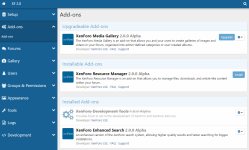
The add-on list is split into three separate lists of add-ons.
When an add-on directory contains a version of files newer than that of the version installed, we mark it as upgradeable and push it to the top of the page.
When an add-on exists on the file system but is not installed (not in the xf_addon table of the database), we pull out some information about the add-on and mark it as installable.
Finally, you will see a list of add-ons which are installed, though you will notice that one of those is disabled.
Of course in XF1 all of the data for an add-on is kept inside an XML file. In XF2, each add-on should provide an XML file (if applicable) for the various types of add-on data (phrases, templates, etc.) and this file is stored in the add-on directory and named data.xml. This file no longer stores information about the add-on title and version. Instead, every add-on should include a manually built addon.json file.
Here's a somewhat complete example from XFMG 2.0:
For the most part, this should be fairly self-explanatory based on what you can see in the above screenshot, so we won't go through everything. Though there are a couple of interesting things here.
Development output
Although somewhat still related to add-ons, this is significant enough to deserve its own section.
If you enable development mode in config.php, this will cause add-on related data to be output as files (usually JSON) to the file system. Files will be written out to a location in the format addons/<addon_id>/_output/<type>/<id>.json.
For example, this is the XFMG navigation tab entry, stored in addons/XFMG/_output/navigation/xfmg.json:
A couple of weeks ago, we went into some detail about what's new for developers in XenForo 2. (You can read that here). We promised we would be back for more and so here it is:
Add-ons
In XF1 there are very few conventions and little structure in terms of the naming of add-ons, where the files are stored and what those files are named. We are changing that in XF2 in quite a significant way.
First of all, there is now a specific directory for all add-ons. Each add-on will have its own directory inside this parent add-ons directory and each directory will be identified by the add-on ID of the add-on. For example, files for XF Resource Manager and Media Gallery will be in the addons/XFRM and addons/XFMG directories respectively where XFRM and XFMG are the new add-on IDs for these add-ons.
On a similar note, a common pattern among existing add-ons is for an add-on vendor to put all of their add-ons within a parent directory indicated by the vendor's name. For example, if you release add-ons under the "Acme Add-ons" brand, you may currently store your add-ons files in the library/AcmeAddOns/AddOnName directory. Your add-on IDs may even be something like AcmeAddOns_AddOnName. In XF2, we support add-on IDs having a vendor prefix as part of the add-on ID, and the vendor prefix is separated by a /. So, if an add-on ID contains a slash, e.g. AcmeAddOns/AddOnName we know the files for the add-on will be stored in addons/AcmeAddOns/AddOnName. As we now use PHP namespaces in XF2, the rest of the add-on ID should be compliant with that format, so add-on IDs should contain only a-z, A-Z, 0-9 and / characters, must not start or end with a /, and must not start with 0-9.
This convention is certainly less flexible, by design, but having a predictable format for such things represents a significant improvement. For example, all add-ons will now have nearly identical install instructions, manually removing add-on files will be a clearer process and it allows us to make the process of installing add-ons different, too.
With that in mind, the new process for installing or upgrading an add-on is to simply upload the contents of the upload directory to the add-onsdirectory on your server. After you have done that, you no longer have to fish out a specific XML file to trigger the install or upgrade - we already know where the required files for an add-on are.
To demonstrate, this is a good point to show you what the new add-on list looks like:
The add-on list is split into three separate lists of add-ons.
When an add-on directory contains a version of files newer than that of the version installed, we mark it as upgradeable and push it to the top of the page.
When an add-on exists on the file system but is not installed (not in the xf_addon table of the database), we pull out some information about the add-on and mark it as installable.
Finally, you will see a list of add-ons which are installed, though you will notice that one of those is disabled.
Of course in XF1 all of the data for an add-on is kept inside an XML file. In XF2, each add-on should provide an XML file (if applicable) for the various types of add-on data (phrases, templates, etc.) and this file is stored in the add-on directory and named data.xml. This file no longer stores information about the add-on title and version. Instead, every add-on should include a manually built addon.json file.
Here's a somewhat complete example from XFMG 2.0:
PHP:
{
   "legacy_addon_id": "XenGallery",
   "title": "XenForo Media Gallery",
   "description": "The XenForo Media Gallery is an add-on that allows you and your users to create galleries of images and videos in your forum, organized into admin-defined categories or user-created albums.",
   "version_string": "2.0.0 Alpha",
   "version_id": 902000010,
   "dev": "XenForo Ltd.",
   "dev_url": "XenForo.com",
   "faq_url": "XenForo Media Gallery | XenForo",
   "support_url": "Media Gallery Support",
   "extra_urls": {},
   "require": {
       "XF": [2000010, "XenForo 2.0.0+"],
       "php": ["5.4.0", "PHP 5.4.0+"]
   },
   "icon": "icon.png"
}
For the most part, this should be fairly self-explanatory based on what you can see in the above screenshot, so we won't go through everything. Though there are a couple of interesting things here.
- We mentioned earlier that the add-on IDs for XFMG and XFRM have changed, and this add-on ID change is handled automatically during upgrade based on the legacy_addon_id key in the JSON file. If that add-on ID exists, it will be marked as upgradeable by this add-on.
- extra_urls is an array of link text: url pairs and these will render below the add-on list item (e.g. after the developer, FAQ and support links) and allow you to display links to other relevant things related to the add-on (perhaps a bug reports link, a manual or whatever you like).
- The require array is a standard way of blocking an add-on install or upgrade if the environment doesn't support the required dependencies. In this particular JSON file, we block install and upgrade if the current XF version ID is below 2000010 and we block if the current PHP version is below 5.4.0. It's also possible to require other add-ons to be installed first, and also block install if certain PHP extensions are missing or not enabled.
- The icon path is relative to the add-on directory. In this example, our XF logo is picked up from addons/XFMG/icon.png.
PHP:
public function installStep1()
{
    // Do stuff here
}
Development output
Although somewhat still related to add-ons, this is significant enough to deserve its own section.
If you enable development mode in config.php, this will cause add-on related data to be output as files (usually JSON) to the file system. Files will be written out to a location in the format addons/<addon_id>/_output/<type>/<id>.json.
For example, this is the XFMG navigation tab entry, stored in addons/XFMG/_output/navigation/xfmg.json:
PHP:
{
   "parent_navigation_id": "",
   "display_order": 30,
   "navigation_type_id": "basic",
   "type_config": {
       "link": "{{ link('media') }}",
       "icon": "",
       "display_condition": "$xf.visitor.canViewMedia()",
       "extra_attributes": []
   },
   "enabled": true
}